
Automated follow up gives a solo HR consultant something a busy calendar never can: consistent, well-timed contact with every prospect who has taken a diagnostic or received a proposal. Done right, it protects your pipeline without diluting your personal brand. There are reminder and follow-up systems built directly into white-label diagnostic and practice-management platforms, so the mechanics run in the background while you stay the visible face of the work. The rest of this piece walks through exactly how to set that up.
TL;DR:
- Automated follow-ups should trigger on multiple events, including diagnostic completion, proposal sent, and prospect inactivity, not just one event.
- Timing and messaging must be tailored, with specific cadences for different stages, such as same-day acknowledgment and a 72-hour unopened proposal check.
- Integration between diagnostics platforms, pipelines, calendars, and reminders ensures no prospect slips through the cracks.
- Personalization using report data and placeholders improves response rates and prevents follow-ups from sounding generic or salesy.
- Tracking key metrics like response rate, proposal conversion, and time-to-close helps measure automation effectiveness and optimize workflows.
Table of Contents
- Quick Checklist: Must-Have Capabilities for Automated Follow Up
- When Should You Trigger a Follow-Up?
- Designing Cadence and Messages: Templates, Timing, and the Review Step
- Integration and Workflow Setup: Pipeline, Calendar, and Task Automation
- Rules for Personalization and the Human-Review Gate
- What Metrics Actually Prove Automation Is Working
- Step-By-Step Implementation Plan for Your First Month
- Types of Automated Follow-Ups and Their Respective Uses
- Compliance Considerations for Automated Follow-Ups
- Automation Tools and Software Options: What to Weigh
- Segmenting and Targeting Recipients for Better Results
- Examples of Automated Sequences That Actually Convert
- Why This Matters More Than the Tools Themselves
- Door Openers: Automated Follow Up Built Into Your Practice
- Sources
Quick Checklist: Must-Have Capabilities for Automated Follow Up
Before you build anything, check your system against these five requirements. Skip one and the whole workflow tends to leak prospects.
- Trigger coverage: it fires on diagnostic completion, proposal sent, and prospect inactivity, not just one event.
- Branding intact: every message carries your name, logo, and voice, never the software's.
- A human-review gate: higher-value or sensitive messages get a pause for your eyes before sending.
- Basic integrations: pipeline stage changes, calendar sync, and task reminders talk to each other automatically.
- KPI visibility: you can see response rate, conversion lift, and time-to-close without pulling a separate report.
If your current setup is missing two or more of these, that's usually why follow-ups are inconsistent rather than absent.
When Should You Trigger a Follow-Up?
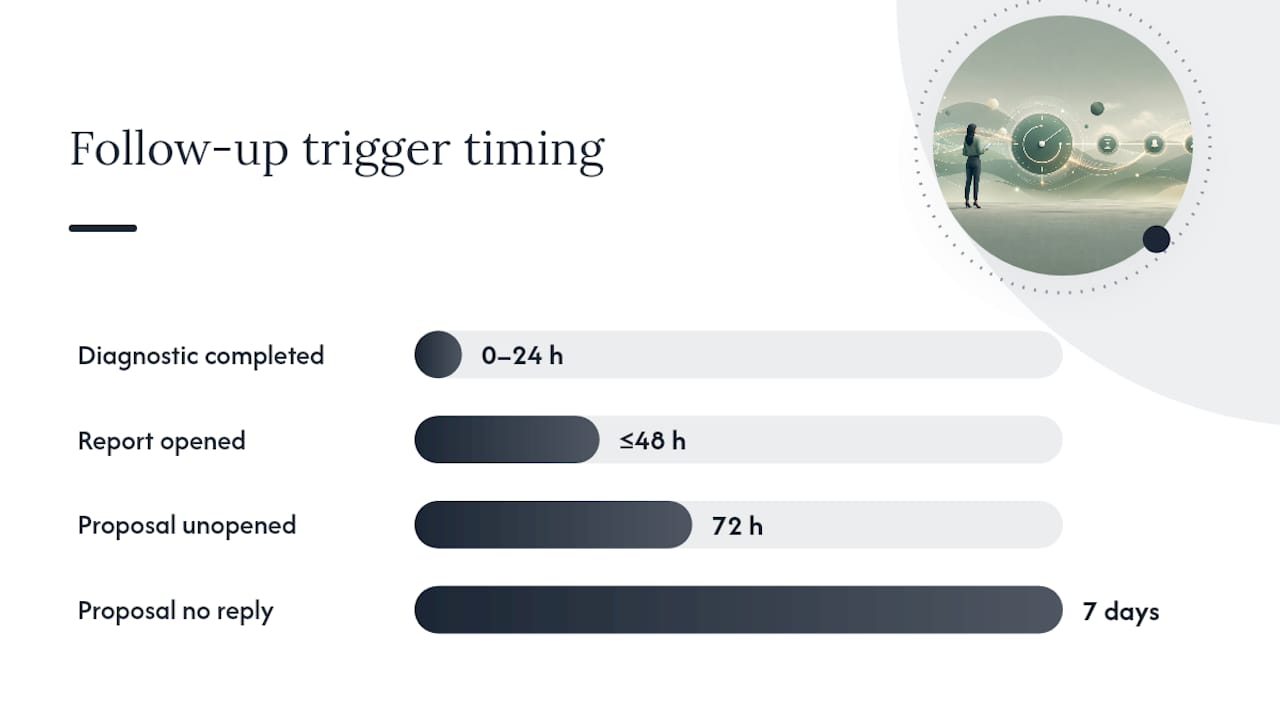
Four events should start a workflow: the diagnostic gets completed, the client-facing report gets opened, the proposal goes out, and the proposal sits unopened for 72 hours. Each one calls for a different message, not the same nudge repeated on a timer.
A completed diagnostic is your warmest moment. That prospect just spent ten minutes thinking about their own turnover, engagement, or manager problems, and a follow-up within a day capitalizes on that attention. A viewed-but-unsigned proposal is a different animal entirely: the most effective cadence pivots to a value-add rather than a generic check-in once you know the prospect actually opened it. Silence is the trickiest signal to read, and treating every unopened proposal as a lost cause is a mistake, since a well-timed follow-up sent within 24 to 48 hours converts meaningfully better than one sent a week later.
- Diagnostic completed: send a same-day or next-day acknowledgment tied to their specific results.
- Report viewed, proposal not sent: trigger a scheduling nudge within 48 hours.
- Proposal sent, unopened at 72 hours: switch to a short, low-pressure check rather than repeating the pitch.
- Proposal opened, no response after a week: pivot to a value-add resource, not another "just checking in" message.
Pro Tip: Track link clicks and report opens as separate signals from calendar bookings. A prospect who reopens a report twice in one day is telling you something a generic "any thoughts?" email will miss entirely.
Avoid firing a follow-up the moment a report is generated but before the prospect has actually opened it. That's a false positive that makes your automation look tone-deaf on day one.
Designing Cadence and Messages: Templates, Timing, and the Review Step
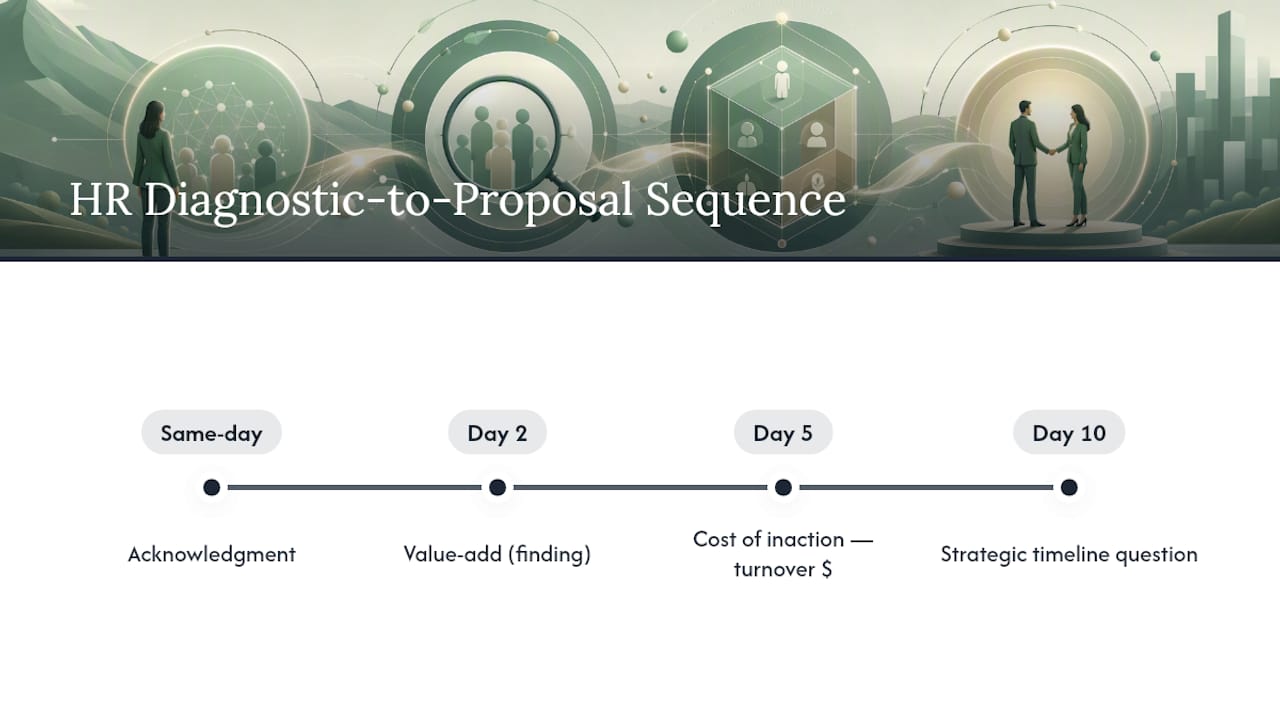
A dependable proposal cadence looks like this: Day 2 sends a value-add tied to their diagnostic findings, Day 5 addresses the objection you'd expect given their results, Day 10 offers a strategic check-in, and Day 21 folds unresponsive prospects into a longer nurture track rather than abandoning them. This structure mirrors the Day 0, 2, 5, 10 cadence recommended for consultant proposals, extended with a nurture stage for solo practices that can't chase every lead forever.
- Day 2: reference one specific finding from their diagnostic and offer a short insight, not a sales push.
- Day 5: name the objection most people in their situation raise (budget, timing, internal buy-in) and address it directly.
- Day 10: ask a strategic question tied to a business outcome, like retention cost or manager turnover.
- Day 21: shift to nurture: share a relevant resource and step back from active pursuit.
Every template needs four parts: a subject line that references their result, one sentence stating the value, a line tying that value to a business outcome (cost of turnover, engagement score, time-to-hire), and one clear next step. Skip any of those four and the email reads like filler.
Pro Tip: For deals above your average engagement size, set the automation to draft the Day 5 and Day 10 messages but hold them for your review. Save full auto-send for the lower-stakes Day 2 and Day 21 touches.
Integration and Workflow Setup: Pipeline, Calendar, and Task Automation
A solo practice needs exactly four things talking to each other: the diagnostics platform, the sales pipeline, Google Calendar, and a reminder or task system. Fewer than that and follow-ups get missed. More than that and you're maintaining integrations instead of billing clients.
Set your pipeline stages so specific moves trigger specific automations. "Diagnostic Sent" should trigger a completion reminder if nothing happens in 48 hours. "Proposal Sent" should trigger the Day 2/5/10/21 cadence. "Meeting Booked" should sync automatically to your calendar and generate a reminder task the day before.
Calendar sync does more than avoid double-bookings. It cuts down no-shows by triggering automatic reminders ahead of scheduled calls, and it gives your follow-up automation a data point: a prospect who books, cancels, then goes silent needs a different message than one who's never engaged at all.
- Diagnostics platform: the source event for most triggers (completed, viewed, shared).
- Pipeline: the system of record for stage changes that fire the next follow-up.
- Google Calendar: sync for meeting confirmations, reminders, and no-show recovery.
- Reminder or task system: the fallback layer that nudges you when automation should pause for a human touch.
Build in that order. Layering automation incrementally, starting with booking and contact creation before adding proposal triggers, keeps you from debugging four broken workflows at once.
Rules for Personalization and the Human-Review Gate
Placeholders should pull from your discovery notes and the diagnostic itself: the specific pain point, a metric from their report, and their stated timeline. Generic mail-merge fields ("Hi [First Name], hope you're well") are the fastest way to make automation obvious and unwelcome.
Set a clear policy on auto-send versus draft-for-review. Lower-stakes touches, like a Day 21 nurture email, can go out automatically. Anything tied to a high-value engagement, a complex reply, or a prospect who's clicked the same link three times deserves a human read before it leaves your outbox. AI can produce a strong first draft immediately after a call or event, which keeps things fast, but the final send for larger opportunities should stay with the consultant, not the software.
Log every automated touch in the deal record, including what was sent and when. That audit trail matters the first time a client asks "didn't we already discuss this?"
What Metrics Actually Prove Automation Is Working
Five numbers tell you whether your follow-up system is earning its place: follow-up sent rate, response rate, proposal-to-close conversion, time-to-close, and re-engagement rate on previously stalled deals.
- Follow-up sent rate: the percentage of eligible triggers that actually fired.
- Response rate: replies per follow-up sent, tracked by cadence step.
- Proposal-to-close conversion: how many sent proposals become signed engagements.
- Time-to-close: days from proposal sent to signature.
- Re-engagement rate: stalled deals that come back to life after a nurture touch.
Run a simple test before trusting the system fully: measure your baseline conversion for four to six weeks with no automation, turn on one workflow (the 72-hour unopened check is a good first candidate), then measure again over the same window. Vary one thing at a time, either the timing or the message, never both, so you know which change actually moved the number.
Step-By-Step Implementation Plan for Your First Month
Build automation in layers, testing each one with two or three real contacts before trusting it fully.
- Week 1: connect calendar booking to automatic contact and deal creation in your pipeline. This is the highest-frequency trigger, so it delivers visible proof the system works within days.
- Week 2: add the proposal-sent follow-up trigger, starting with drafts you review before sending.
- Week 3: build the signed-client onboarding sequence, so new engagements start with consistent communication instead of an improvised welcome email.
- Week 4: add a stale-pipeline re-engagement rule for deals that haven't moved in 30 days.
Each automation typically takes an hour or two to configure properly, based on how solo consultants have built similar systems in stages. Before flipping any workflow from draft-for-review to full auto-send, confirm three things: the placeholders pull correctly every time, the timing matches your actual sales cycle, and you've watched it run cleanly on at least three test contacts. Start with the lowest-risk follow-ups, the completion reminders and calendar confirmations, and only expand into proposal cadences once those are running without your intervention.
Types of Automated Follow-Ups and Their Respective Uses
Email remains the backbone of most consultant follow-up systems, and for good reason: it's asynchronous, easy to personalize with diagnostic data, and simple to log in a pipeline. Use it for anything that benefits from detail, a value-add tied to a specific report finding, an objection response, a proposal recap.
SMS earns its place for time-sensitive, low-content touches: a meeting reminder the morning of a call, or a quick nudge when a proposal deadline is approaching. Keep SMS short and never use it for anything that requires nuance, since texts read as more intrusive than email if they carry sales pressure.
Phone calls still outperform every digital channel for high-value engagements or when a prospect has gone silent after showing real interest. Automation's job here isn't to replace the call, it's to remind you to make it, at the right moment, with the right context pulled up on screen.
Social media follow-up, typically a LinkedIn comment or message, works best as a light-touch supplement rather than a primary channel. It's useful for staying visible with a prospect who isn't responding to email but is still viewing your content, and it rarely needs automation beyond a reminder to check in personally.
The right mix depends on the deal stage. Early diagnostic follow-ups lean on email. Meeting logistics lean on SMS and calendar reminders. Stalled, high-value deals lean on a phone call automation prompts you to make, not one it makes for you.
Compliance Considerations for Automated Follow-Ups
Automated follow-up touches real legal obligations, and ignoring them creates risk that's entirely avoidable with a few habits built into your workflow from the start.
If you work with prospects or clients in the European Union or UK, GDPR governs how you collect, store, and use personal data, including diagnostic responses and contact information used to trigger follow-ups. That means having a lawful basis for contacting someone, honoring opt-out requests immediately, and not retaining data longer than necessary for the engagement. A branded diagnostic that asks for an email address should make clear, at minimum, what that data will be used for.
In the United States, the CAN-SPAM Act sets rules for commercial email: a working unsubscribe link, accurate sender information, and no misleading subject lines. These are not optional add-ons. An automated cadence that doesn't include a clear opt-out is a compliance gap, not a minor oversight.
Every follow-up sequence should include an easy way to stop it. Build that into your template anatomy from the beginning rather than retrofitting it later, and keep a record of consent and opt-outs in the same deal record where you log the rest of your follow-up activity. For solo consultants working across borders, the safest default is to apply the stricter standard everywhere rather than trying to track which rule applies to which prospect.
Automation Tools and Software Options: What to Weigh
Solo consultants generally choose between three categories of tooling, and each comes with a real trade-off.
General-purpose CRM platforms offer flexibility and deep customization, but they require you to build diagnostic-aware triggers yourself, which takes setup time most solo practices don't have to spare. Standalone email sequencing tools are quick to launch and good at cadence timing, but they typically live outside your pipeline entirely, which means your follow-up history and your deal record are two different places you have to check.
Purpose-built practice-management platforms that bundle diagnostics with pipeline and calendar tools, like Door Openers, trade some flexibility for speed: the triggers already understand what "diagnostic completed" or "proposal sent" means, because the diagnostic and the pipeline live in the same system. The tradeoff is you're working within that platform's structure rather than assembling your own stack piece by piece.
The right choice depends on how much time you want to spend on configuration versus how quickly you need a working system. A consultant with strong technical comfort might prefer assembling separate tools for maximum control. A consultant who wants automated reminders running inside the same place they send diagnostics and manage a pipeline will get there faster with an integrated platform.
Segmenting and Targeting Recipients for Better Results
Not every prospect should get the same cadence, and segmenting your list is what separates automation that converts from automation that annoys.
Segment first by diagnostic type. A prospect who completed a Staff Turnover Cost Calculator is thinking about a specific dollar figure, so their follow-up should reference that number directly. Someone who took a manager-effectiveness pulse survey is thinking about a different problem entirely, and a generic template that ignores which tool they used will read as impersonal immediately.
Segment second by engagement level. A prospect who opened their report three times in 24 hours is signaling urgency, and a faster, more direct follow-up fits. A prospect who hasn't opened anything in a week needs a lighter touch: a value-add resource rather than another direct ask.
Segment third by company size or sector where it's relevant to the diagnostic findings. A ten-person firm with high turnover costs cares about different numbers than a fifty-person firm with a manager-effectiveness gap, even if both took the same tool.
The goal isn't building elaborate audience categories. It's making sure the next message a prospect receives reflects what you actually know about them, because that's the difference between a follow-up that feels considered and one that feels automated.
Examples of Automated Sequences That Actually Convert
A few sequence patterns hold up across different types of consultant work, adapted to the tools involved.
In professional services broadly, the diagnostic-to-proposal sequence works because it lets the prospect's own results carry the persuasion. Rather than a cold pitch, the follow-up says, in effect, "here's what your numbers show, here's what that costs you, here's the next step." This context-aware approach to follow-up, referencing what the prospect specifically shared, tends to produce meaningfully stronger response and conversion than generic outreach, since it treats the prospect's own data as the reason to act, not a sales script.
In HR consulting specifically, a strong sequence starts with the diagnostic completion (same-day acknowledgment), moves to a Day 2 value-add referencing a specific finding, addresses cost-of-inaction on Day 5 tied to the turnover calculator's dollar figure, and closes with a Day 10 strategic question about timeline. Consultants running this pattern report it performs better than a flat "checking in" cadence, because each touch adds new information rather than repeating the last one.
In adjacent B2B service fields, like accounting or financial advising, a similar structure holds: diagnostic or audit completion triggers an immediate acknowledgment, followed by staged value-adds tied to whatever the audit revealed, rather than a single generic reminder repeated on a loop.
The common thread across all of these: the sequence works because it's built around what the prospect already told you, not around a fixed script that ignores their specific situation.
Why This Matters More Than the Tools Themselves
Most consultants think about follow-up automation as a time-saving trick. It's really operational leverage: consistent reminders raise your floor so nothing slips, and they free enough capacity to raise your ceiling on billable work. Door Openers builds branded diagnostics and reminders into one workflow so that leverage doesn't require a second platform. Pick one trigger, the 72-hour unopened check is a good place to start, and test it against three real prospects before building anything else.
— aaron
Door Openers: Automated Follow Up Built Into Your Practice
There are platforms built specifically for the workflow this article just described: branded diagnostics, a sales pipeline, calendar sync, and follow-up reminders, all running in one place instead of across four disconnected tools. Reports can be configured to carry your name and logo rather than the platform's, so the automation can stay invisible while your brand stays front and center.
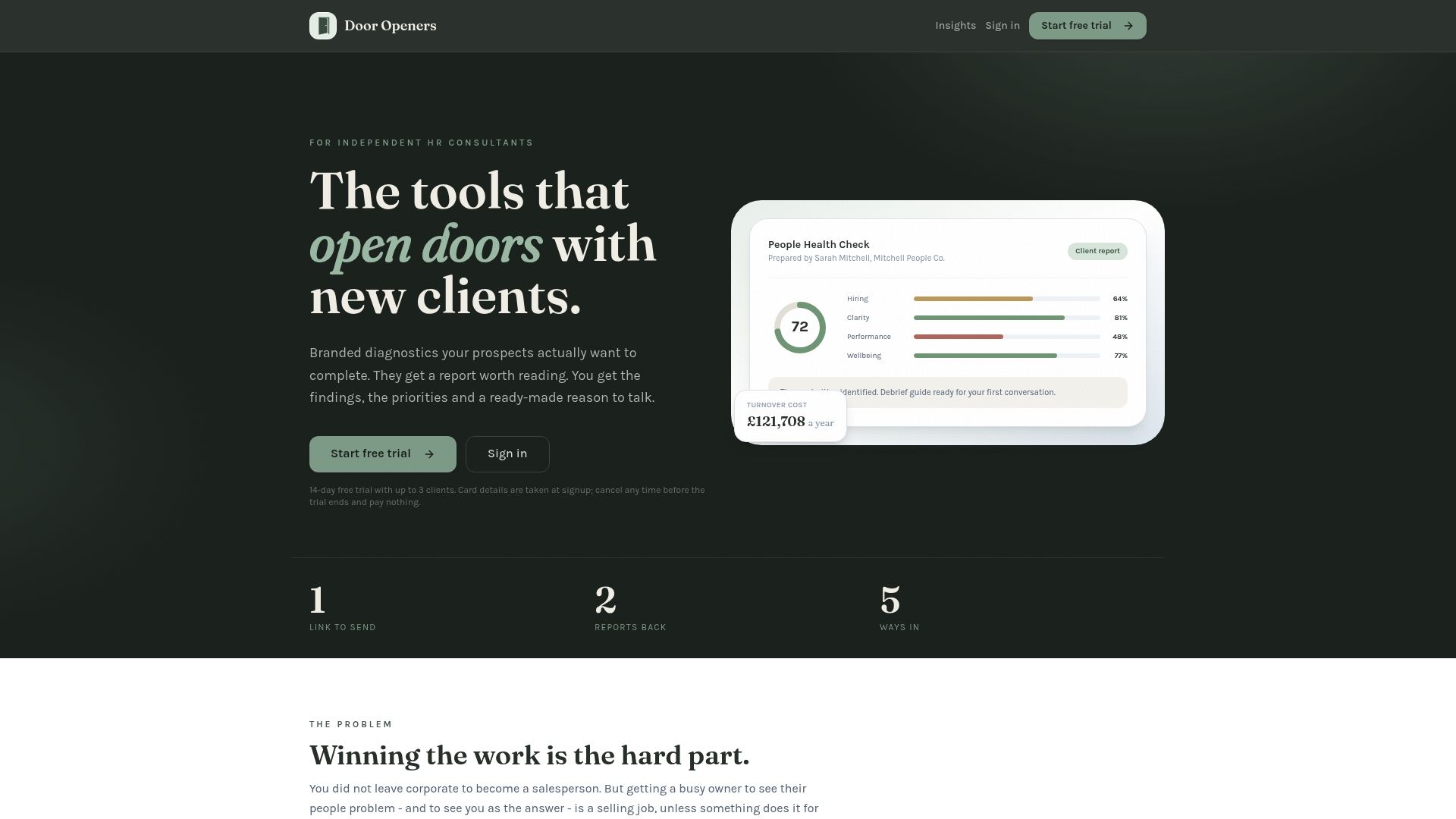
There are subscription plans running monthly or annually, covering a limited number of client slots, and these include a free trial period so you can test workflows before committing. Card details may be collected at signup, and billing starts automatically once the trial ends unless you cancel first.
Start small: configure one automated follow-up, the diagnostic-completion reminder or the 72-hour unopened proposal check, and run it against three real prospects during your trial. If it holds up, expand from there. Explore Door Openers and set up your first automation today.
Sources
For consultants who want to go deeper on cadence design and workflow sequencing, a few sources informed the recommendations in this piece. SoloClientStack's guide to proposal follow-up automation breaks down the Day 0 through Day 10 cadence in more detail, while its broader Consultant Operating System guide covers building an entire automation stack in stages. Implemento's piece on automating client follow-up without losing the personal touch addresses how to keep messages from feeling robotic, and Yesware's overview of automated sales follow-ups explains the administrative-gap problem automation is designed to solve.
- Proposal Follow-Up Automation for Consultants: Simple Workflow That Closes More Deals | SoloClientStack